23 Mayıs 2022 Pazartesi

VOKI:Speak Through Your Avatar!


      There is another application similar to Flipgrid called VOKI. It is a web site where you can create an avatar for yourself and speak through it.
      There are plenty of options, so you can be anyone you want, even Barack Obama! You can customize your avatar through changing its clothes, hair style and colour, occupation, background etc. Here is my avatar:
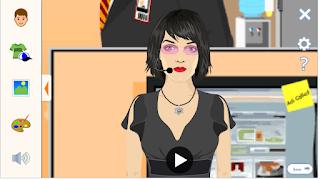

     These avatars make the learning process more fun! It also encourages students to make speaking practice, since they are speaking through their avatars.

    If you want to know more about VOKI, you can watch the following video:


     See you 👋👋👋


22 Mayıs 2022 Pazar

Flipgrid:Video Discussions


     Flipgrid is a web site where you can have video discussions. You can assign your students to introduce themselves via Flipgrid for your first class or you can find a topic for them to discuss. It increases the engagement and comprehension of the students.

    You can create an account through your email. And you can join a discussion through a join code.

    Videos are made through the camera of the web site and then uploaded to the dicsussion page.

    It is a link to our Flipgrid discussion: https://flipgrid.com/1e7e0c80

     If you want to know more about Flipgird you can watch the following videos:


    See you 👋👋👋

Storybird: Digital Book


      Storybird is a web site where you can easily read and write picture book, comics and poetry with a variety of pictures.

     It helps students to improve their creativity by combining different pictures and creating a story. They can also enjoy reading a bunch of existing stories.

     It has also some disadvantages. First, you can not add pictures to Storybird, that's why there may be some limitation for your stories. Secondly, you need to subscribe to Storybird, and it is free only for 7 days.

     You can easily create an account with your email. Then you can click write and this page will appear:


     You can select a picture for your cover and start writing right away!

     You can read my picture book through this link: Adventures of Big Mouth

     If you want to know more about Storybird you can watch this video:


See you 👋👋👋

21 Mayıs 2022 Cumartesi

Trello: List Making Application


      Trello is a website where you can make lists, add documents and share. You can create your tasks in different columns. 

     Trello can bu used for a variety of areas including real estate management, accounting, lesson planning, web design etc. 

     Today, I will focus on educational advantages. You can create your own board or you can use existing templates such as:


     You can just store your documents and create personal plans or you can share it with your students and give assignments to them.

     You can easily sign up with your mail. Here is a tutorial for Trello:


See you 👋👋👋

Google Jamboard: Interactive Whiteboard


     Jamboard is a digital whiteboard which enables people to share their knowledge regardless of space and time. People up to 50 can use a jam simultaneously which is impossible for a normal classroom whiteboard.

     You can easily join Jamboard through your google account and you can easily create a jam through clicking the plus sign in the bottom right corner of the page.

     Then you will see a blank white board:


    Now you can start drawing shapes, adding notes or pictures and prepare a workplace for your students beforehand. You can assign group work roles such as leader, writer, presenter and others. 

    If you don't have enough time you can use Slides Mania for templates. Through Jamboard you can do a variety of activities to enhance the teaching and learning process.

    If you want to know more about Jamboard you can watch the video below:


     See you 👋👋👋

14 Mayıs 2022 Cumartesi

Edpuzzle: Create Interactive Videos!

     Edpuzzle is a web-based application where you can edit videos to make your students actively engage in the lesson contents.

     You can easily create a teacher account and search for videos suitable for your lessons. It is possible to cut the video and just focus on the important parts. You can also add your voice over the video. 

     You can add open ended or close ended questions or additional notes in the video to make a more enhanced learning process.

     There is also an option which prevents students from skipping the video.

     This is the link of the video that I've made through Edpuzzle:

     https://edpuzzle.com/media/627fd3a32fdf7242d1ee6164

      For the further information you can visit the following link: 

     Getting Started with Edpuzzle

Pear Deck for Google Slides!


      Hello~ this week we tried Pear Deck which is a web-based application where you can create interactive slides to enhance the quality of the learning process. 

     First, you should create a student or teacher account using your school's postal code and your email. Then you should activate your account with the link sent to your email. 

     After that you should add Pear Deck to your Google Slides, then you can start creating your presentations. 


     You can ask your students open-ended questions or close-ended questions. You can also expect from your students to give an answer through drawing or dragging the dot.

     It is also possible to start with Google Slides, continue with Pear Deck and finish your presentation with Google Slides

     To make the ordinary prestentations unique and to engage students with lesson through their active participation. It also enables a secure and comfortable environment where students can share their ideas and knowledge without fear of making mistakes and to be mocked. Because all of the answers are appearing anonymous.

     If you want to know more about Pear Deck you can visit the following link:

https://www.youtube.com/watch?v=GfAOZY_lbps

See ya 👋👋👋

7 Mayıs 2022 Cumartesi

Duolingo~ An Entertaining Way To Learn a Language!

     Duolingo is an application where you can learn a variety of languages in an entertaining way. This languages include English, Spanish, German, Italian, Russian, Arabic, Japanese, Chinese, Korean, etc. It makes you practice writing, reading, listening, speaking, and translating between your mother tongue and that particular language. 
     It has 10 different leagues which are in order from first to last Bronze, Silver, Gold, Sapphire, Ruby, Emerald, Amethyst, Pearl, Obsidian and Diamond League. With this way it encourages you to study harder through competing with other learners.
    The lessons are being divided into topics or according to grammar makes it easier to comprehend. It also induces you to study everyday through unique and encouraging sentences like "Hey, it's Lily. Duo says you're ignoring him, so I'm filling in. Keep up your 5 day streak. Or don't. Whatever".

     I've been using Duolingo for a few years and found it beneficial to learn a new language. Currently I'm learning Spanish, Chinese and Korean. And it is quite fun!


  Right now I'm on Emerald League and I was number 1 last night :')

You can access the website through this link:

 https://tr.duolingo.com/


You can also dowload the application from Google Play Store or Apple App Store.

Have fun! See you 👋👋👋

My Certificate!


     Through infinite sources on the Internet we can always learn new things. There are plenty of websites where you can get free courses on any topic you are interested in. This websites include edX, Udemy, IBB Enstitü, Bilge İş, Coursera, etc. These courses supports life-long learning, therefore you can benefit from them regardless of age, time or space. 

    Also, it has a range of different type of areas such as language learning, fine arts, computer related applications, pediatric, sociological, etc.

     I took a course from IBB Enstitü called "How to Write a Formal Email". Both during my academic life and after my graduation I will need this ability to contact with my teachers or my employers, that's why I thought that I should take this course.

     Here is my certificate:


See you 👋👋👋


Designing Interactive Online Materials Using APITWIST

In our recent project for the Material Design course, my friend Gülsüm and I embarked on an exciting journey to create interactive online ma...